
Perspt
PERSPT / AI TOOLS FOR DEVELOPERS
AI chat and coding
in your terminal.
Ask questions, understand a codebase, or ask a coding agent to fix a bug. Perspt runs in the terminal, connects to cloud or local AI models, and uses the project’s compiler and tests to check the agent’s work.
WHAT CAN PERSPT DO?
Chat with AI or put it to work on code.
Chat with AI
Ask a question and read the answer as it arrives. The full-screen chat displays Markdown, code, and tables. Paste a multiline question, switch models, or connect read-only MCP tools.
perspt chat
Use a simpler chat interface
Type a message, get an answer, and keep the conversation in the terminal. Use simple-chat for a line-by-line chat without a full-screen interface. Save the conversation with --log-file.
perspt simple-chat --log-file chat.txt
Ask the agent to work on code
Fix a bug, add a feature, or write tests. Give Perspt a task and a project folder. It edits a separate copy, runs the build and tests, and asks for review before applying the result.
perspt agent -w ./app "Fix the parser tests"
Use Perspt in a Rust application
Build an AI workflow with Perspt’s libraries. Reuse the code for running agents, checking their output, and recording session history. The SDK guide explains which crates to use.
cargo add perspt-sdk perspt-coding \
  --git https://github.com/eonseed/perspt
HOW THE CODING AGENT WORKS
Describe the task. Review the code.
Perspt works on a separate copy of the project. The agent can read files, make edits, and run the project’s tools. When a build or test fails, it uses the error messages to try a fix. The original files are updated after the required checks pass and the result is approved.
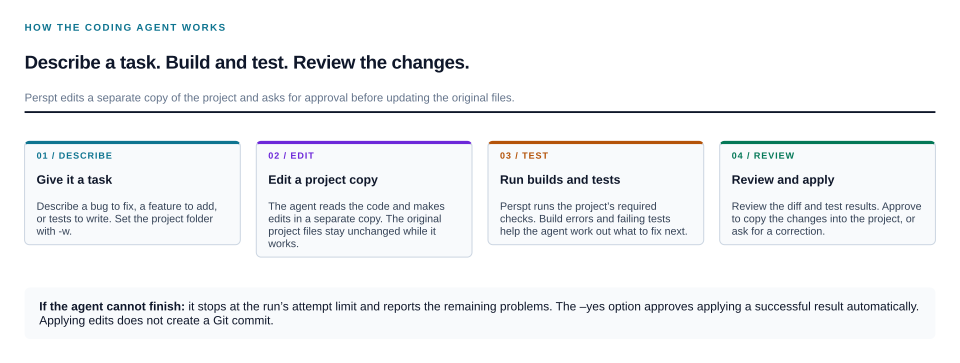
Agent mode is experimental. Passing tests can miss bugs, so review the diff and the tests before committing. Perspt does not create a Git commit when it applies edits.
LEARN FROM BUILD AND TEST FAILURES
Keep improvements. Reject regressions.
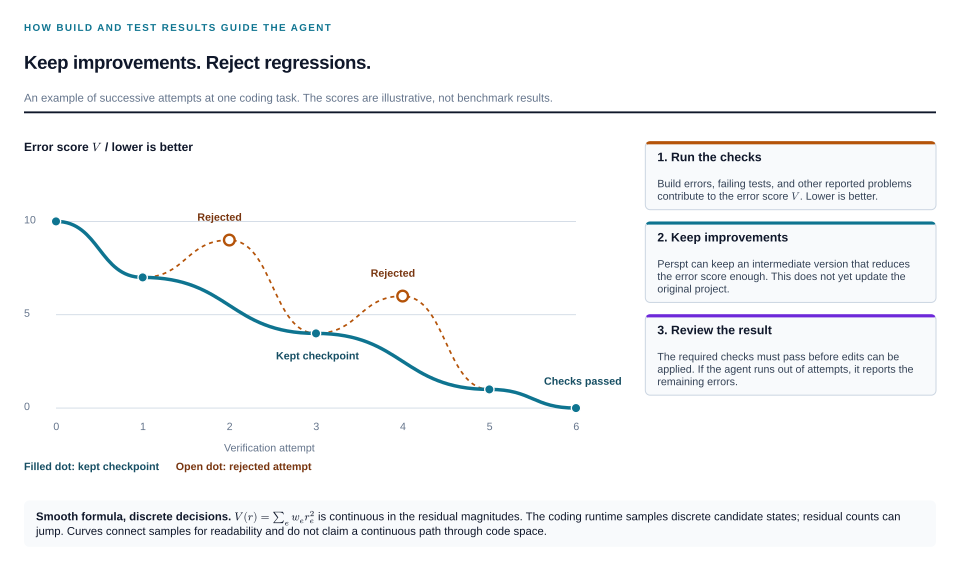
While required checks are failing, Perspt keeps an attempt only if its error score improves enough. Otherwise, it restores the best version it has saved and uses the reported problems to try another fix. An improvement can help the next attempt; the required checks still need to pass before the result can be applied.
FOLLOW THE WORK
See what the agent is doing.
Add --dashboard to watch a run in the browser. See the task, build and test results, and the history of the agent’s actions.
perspt replay <session-id> reads the saved history without calling an AI model or rerunning tests. perspt resume --last continues an interrupted session.
STAY IN CONTROL
Review edits before they reach the project.
Interactive runs ask for approval before applying code changes. Use --yes when an unattended run should apply a successful result automatically.
perspt ledger --rollback <session-prefix> undoes a session’s latest set of applied edits. It refuses to overwrite files changed afterward.
Linux and macOS support OS sandboxing. Native Windows agent runs need an explicit option to run without that isolation, or WSL.
Install Perspt and start chatting
With Rust 1.100 or later installed:
git clone https://github.com/eonseed/perspt.git
cd perspt
cargo install --locked --path crates/perspt-cli --features bundled
export GEMINI_API_KEY="<api-key>"
perspt chat
For local AI models, connect Ollama and choose an installed model such as ollama::llama3.2. To try the coding agent, start with a small task in a project whose build and tests already run locally.