
The Perspt Book
Learn to use Perspt for AI chat and coding in the terminal. We start with installation and a conversation, then use the coding agent to work on a project and review the result.
Where to start
| Task | Guide |
|---|---|
| Try Perspt | Quick Start: Install Perspt, connect a provider, and ask a question. |
| Use a local model | Local Models with Ollama: Connect Ollama and select an installed model. |
| Run a coding task | Agent Mode Tutorial: Ask the agent to edit code, run tests, and show the result for review. |
| Run without prompts | Headless Mode: Automate a task and save its result as JSON. |
| Use Perspt from Rust | API & SDK Reference: Choose the libraries needed for a Rust application. |
What Perspt does
- AI chat with
perspt chat: a full-screen conversation with formatted answers, code, and multiline input. - Simple terminal chat with
perspt simple-chat: type a message, read the answer, and optionally save the conversation. - Coding tasks with
perspt agent: ask the agent to fix a bug, add a feature, or write tests. It edits a separate copy and runs the project’s tools before asking for review. - Rust libraries for adding AI workflows, build and test checks, and session history to another application.
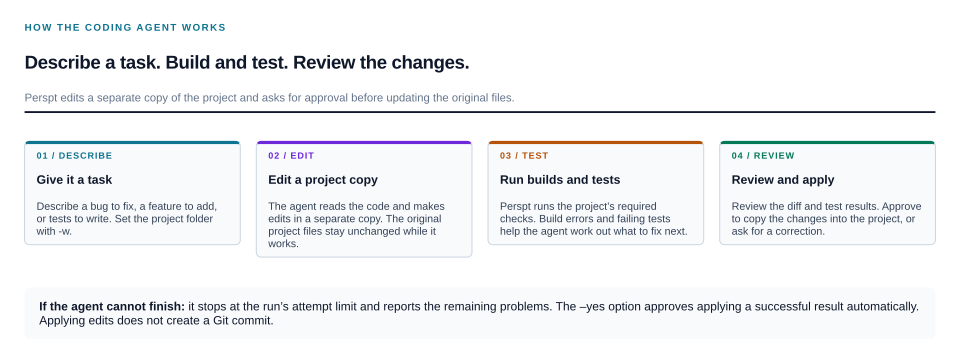
Agent mode is experimental. We review the code and tests before committing, because passing checks can miss bugs. Introduction to Perspt explains the main commands and SRBN Architecture covers the implementation in detail.
Getting Started
Tutorials
User Guide
Concepts
How-To Guides
Reference
API & SDK Reference
Developer Guide
Appendices