
- Number
-
000001
- Title
-
PSP Purpose and Guidelines
- State
-
active
- Type
-
process
- Authors
-
Vikrant Rathore, Ronak Rathore
- Created
-
2025-06-11
- Updated
-
2026-10-28
- Discussion
- Labels
-
process, governance, workflow
PSP Purpose and Guidelines
Abstract
This PSP defines the purpose, process, and guidelines for Perspt Specification Proposals (PSPs). PSPs provide a structured way to propose significant changes, collect community input, and document design decisions for Perspt through GitHub-native workflows with automation support.
Motivation
Perspt is a terminal user interface (TUI) application that requires careful consideration of user experience, feature design, and technical implementation. As Perspt evolves, we need a structured yet lightweight process for:
- Proposing significant changes while avoiding bureaucracy for minor fixes
- Documenting design decisions with focus on TUI-specific considerations
- Building community consensus through GitHub-native discussion workflows
- Maintaining project history through version-controlled PSP documents
The PSP process balances structure with simplicity, using GitHub automation to minimize administrative overhead while ensuring thorough consideration of major changes.
Proposed Changes
What Makes a Good PSP?
A successful PSP must meet these essential criteria:
Core Requirements:
- Clear Purpose Statement: Addresses a specific need in Perspt’s technical, community, or process domain
- Complete Specification: Provides sufficient detail for implementation or adoption
- Community Value: Represents a net improvement for the Perspt ecosystem
- Actionable Content: Includes concrete steps or specifications that can be acted upon
- Appropriate Scope: Focused on a single key proposal or process change
Quality Standards:
- Focused Scope: Single key proposal per PSP (split complex changes into multiple PSPs)
- Evidence-Based: Includes user feedback, community input, or technical justification
- Well-Researched: Shows consideration of alternatives and existing practices
- Clear Documentation: Written in accessible language with examples where helpful
- GitHub-Native: Leverages GitHub tools and automation for efficient workflow
Type-Specific Considerations:
- Feature/Enhancement PSPs: Consider TUI constraints, accessibility, keyboard navigation, performance
- Process PSPs: Address workflow efficiency, automation opportunities, community participation
- Informational PSPs: Provide valuable guidance, document decisions, or establish conventions
- Community PSPs: Foster collaboration, improve communication, or establish governance
PSP Categories and Thresholds
Requires PSP (Significant Changes):
Technical Changes:
- New major features or capabilities
- Changes to command-line interface or core architecture
- Modifications to configuration format or data structures
- UI/UX pattern changes affecting user workflows
Process & Community Changes:
- Development workflow modifications
- Contribution guidelines updates
- Release or maintenance process changes
- Community governance or decision-making processes
- Documentation standards or tooling changes
Informational Content:
- Design philosophy documentation
- Best practices and conventions
- Community guidelines and codes of conduct
- Technical decision records for significant choices
Does NOT Require PSP (Minor Changes):
- Bug fixes without user-visible behavior changes
- Performance improvements without API changes
- Minor documentation corrections or updates
- Code refactoring with identical external behavior
- Routine maintenance tasks or dependency updates
- Minor cosmetic adjustments to existing features
GitHub Automation Support:
- Automated PSP detection using unified PR template with PSP checkbox
- PSP validation ensuring both checkbox selection and PSP file presence
- Status tracking and automated project board integration
- Discussion thread management and notifications
- Automated formatting and link validation
- PR comment guidance for proper PSP submission process
PSP Types
Feature PSPs introduce new functionality or capabilities to Perspt:
- New UI components, interaction patterns, or user-facing features
- Additional command-line options or modes
- Integration with external tools or services
Enhancement PSPs improve existing Perspt functionality:
- Performance improvements with user-visible impact
- Usability improvements to existing features
- Accessibility enhancements and inclusive design
UI/UX PSPs modify the terminal user interface or user experience:
- Changes to visual design, layout, or interaction patterns
- New keyboard shortcuts or navigation workflows
- Terminal compatibility and rendering improvements
API Change PSPs modify Perspt’s external interfaces:
- Command-line interface modifications or extensions
- Configuration file format changes or new options
- Core architecture changes affecting extensibility
Process PSPs describe development, community, and governance processes:
- Changes to the PSP process itself or development workflows
- Contribution guidelines, code review, or release processes
- Community governance, moderation, or decision-making procedures
- Tooling and automation for development or community management
Informational PSPs document design decisions, conventions, or guidance:
- Design philosophy and architectural principles
- Best practices for Perspt development or usage
- Community guidelines, codes of conduct, or communication norms
- Technical decision records for significant architectural choices
PSP Lifecycle and Statuses
PSPs follow a straightforward lifecycle with clear status transitions:
Unassigned: An unnumbered authoring draft awaiting maintainer review. A maintainer assigns its PSP number with guidedog dsc promote.
Draft: A numbered proposal under development by the author. Assigning a number does not open community discussion.
Discussion: Ready for community review and feedback. All discussion happens in a dedicated GitHub Issue.
Accepted: Approved by project maintainers for implementation. For Process PSPs, this means the process is adopted.
Rejected: Not approved by maintainers. Rationale is documented in the discussion issue.
Final: Implementation complete and merged. Only applies to PSPs involving code changes.
Withdrawn: Removed from consideration by the author at any stage.
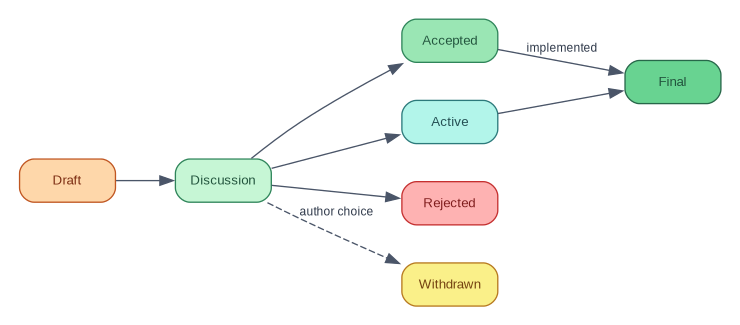
Simplified PSP Workflow
- Phase 1: Idea & Initial Discussion (Optional)
-
Start with a GitHub Issue to gauge interest. If the change seems significant, proceed to create a PSP.
- Phase 2: Draft PSP & PR
-
-
Author actions:
- Fork the repository
- Run
guidedog dsc new "Proposal title" --dir=docs/psps - Edit
docs/psps/records/XXXXX-proposal-title.rstin stateunassigned - Create a GitHub Issue for PSP discussion
- Submit a Pull Request using the unified PR template: - Check the “PSP” checkbox - Fill out the PSP-specific sections (PSP number, type, status) - Add the PSP file to the PR
-
Automated PSP detection:
- GitHub automation detects PSP PRs based on the checked “PSP” checkbox and presence of PSP files
- Validation ensures both requirements are met for proper PSP processing
-
Maintainer review:
- Review PR for basic structure and completeness
- When ready, run
guidedog dsc promote <slug> --dir=docs/pspsto assign a six-digit number and keep the proposal indraft - Review the record, registry, and reading-order changes together
- Merge the reviewed pull request; merging alone never assigns a number or changes state
-
- Phase 3: Discussion
-
- A maintainer runs
guidedog dsc state <number> --to=discussion --reason="Ready for review" --dir=docs/pspsand submits the changes through a reviewed pull request - All discussion occurs in the dedicated GitHub Issue
- Author may submit additional PRs to update the PSP based on feedback
- A maintainer runs
- Phase 4: Decision
-
- Project maintainers decide to Accept or Reject the PSP
- Decision and rationale are documented in the GitHub Issue
- PSP status is updated via PR to reflect the decision
- Phase 5: Implementation (if Accepted)
-
- Code changes developed in separate PR(s) referencing the PSP number
- PSP’s Reference Implementation section can be updated with links
- Phase 6: Finalization
-
- Once implementation is merged, PSP status changes to Final via PR

Rationale
This simplified PSP process is designed to be:
Lightweight and Practical: By leveraging GitHub’s native tools (Issues, PRs, automation), we minimize administrative overhead while maintaining proper documentation and decision tracking.
Community-Focused: Dedicated GitHub Issues for each PSP ensure focused discussions while allowing maintainers to make final decisions based on community input.
GitHub-Native: Using familiar GitHub tools (Issues, PRs, Actions) makes the process accessible to developers and community members already contributing to Perspt, reducing barriers to participation while enabling powerful automation.
Maintainer-Controlled: Maintainers assign numbers and change lifecycle states through reviewed pull requests. GitHub Actions validates and publishes proposals and reports stale discussions; it never promotes a proposal or changes its state.
Community-Inclusive: Process accommodates technical contributions, community governance, informational documentation, and process improvements, ensuring all types of valuable contributions have a structured pathway.
TUI-Aware: Special emphasis on terminal application considerations acknowledges that CLI tools have unique design constraints, accessibility requirements, and interaction patterns that differ from web or desktop applications.
Scalable: The process accommodates both small teams and larger contributor bases without becoming bureaucratic for routine changes.
Backwards Compatibility
This PSP establishes the foundational process for Perspt PSPs. Since this is the initial implementation:
- No Existing PSPs: This process applies to all future PSPs
- Current Development: Existing development practices continue unchanged for routine bug fixes and minor enhancements
- Process Evolution: Future changes to the PSP process will be handled through new PSPs (self-referential updates)
Migration from informal proposals to PSPs will happen gradually as contributors adopt the new process for significant changes.
Reference Implementation
The PSP process is implemented through:
- Process Documentation: This PSP (000001) and the PSP Index (000000)
- PSP Template: docs/psps/source/psp-template.rst with comprehensive guidance for all PSP types
- GitHub Integration: Unified PR template with PSP checkbox, Issue templates for PSP discussions, and automated workflows
- Automation Support: GitHub Actions workflows for PSP detection, validation, status tracking, and automated guidance
- Documentation System: Sphinx configuration rendering PSPs to navigable website with cross-references and search
- Community Tools: Discussion templates, review checklists, and status dashboards for transparency
GitHub Automation Features: * Unified PR template with PSP type detection via checkbox * PSP validation requiring both checkbox and PSP file presence * Automated PR comments providing guidance for proper PSP submission * Status transition validation and notifications * Discussion thread linking and management * Project board integration for tracking PSP progress * Format and link validation in CI/CD pipeline * Automated updates to PSP index and cross-references
Assets Organization: Each PSP can have an associated assets folder (docs/psps/source/psp-NNNN/) for diagrams, mockups, process flows, and other supporting materials.
Open Issues
Several aspects will be refined based on early PSP experience:
- Automation Enhancement: Further optimize GitHub Actions automation for advanced PSP lifecycle management, enhanced notification systems, and deeper integration with project planning tools beyond the current detection and validation features
- Decision Authority: Clarify final decision-making authority for different PSP types (technical, process, community, informational) and potential conflict resolution
- Review Requirements: Establish whether PSPs need formal review from specific maintainers, community representatives, or domain experts
- Community Engagement: Develop best practices for inclusive community discussion and consensus building across different PSP types
- Template Evolution: Refine the PSP template based on real-world usage across technical, process, and informational PSPs
- Process Metrics: Define success metrics for PSP adoption, community participation, and process efficiency
These questions will be addressed through experience and follow-up PSPs as the community grows and the process matures.
References
- PSP Workflow and Catalog Guide — GuideDog
guidedog dsccommands and lifecycle state machine. - PSP Registry — Complete registry of Perspt Specification Proposals.
- Python Enhancement Proposals (PEP 1) — Historical inspiration for structured specification proposals.
Copyright
This document is placed in the public domain or under the CC0-1.0-Universal license, whichever is more permissive.